
Module 03
โมดูล 03
Product Catalog Management
การจัดการสินค้าและเมนู
Maintain bilingual menus, pricing, stock levels, and category visuals in a single grid. Built-in BOM support links every menu item to recipes and raw materials.
จัดการเมนูสองภาษา ราคา ระดับสต๊อก และสีหมวดหมู่ในกริดเดียว รองรับ BOM เชื่อมสินค้าเข้ากับสูตรและวัตถุดิบ.
- Material-UI DataGrid with search, filters, and sort for 10,000 products.
- DataGrid ของ Material-UI พร้อมค้นหา กรอง และเรียงสำหรับ 10,000 รายการ.
- Thai & English names, descriptions, and units for every product.
- ชื่อ คำบรรยาย และหน่วยสินค้าได้ทั้งภาษาไทยและอังกฤษ.
- Bulk update, duplicate, and activate/deactivate actions with undo.
- อัปเดตรวม คัดลอก และเปิด/ปิดการใช้งานได้พร้อมปุ่มย้อนกลับ.
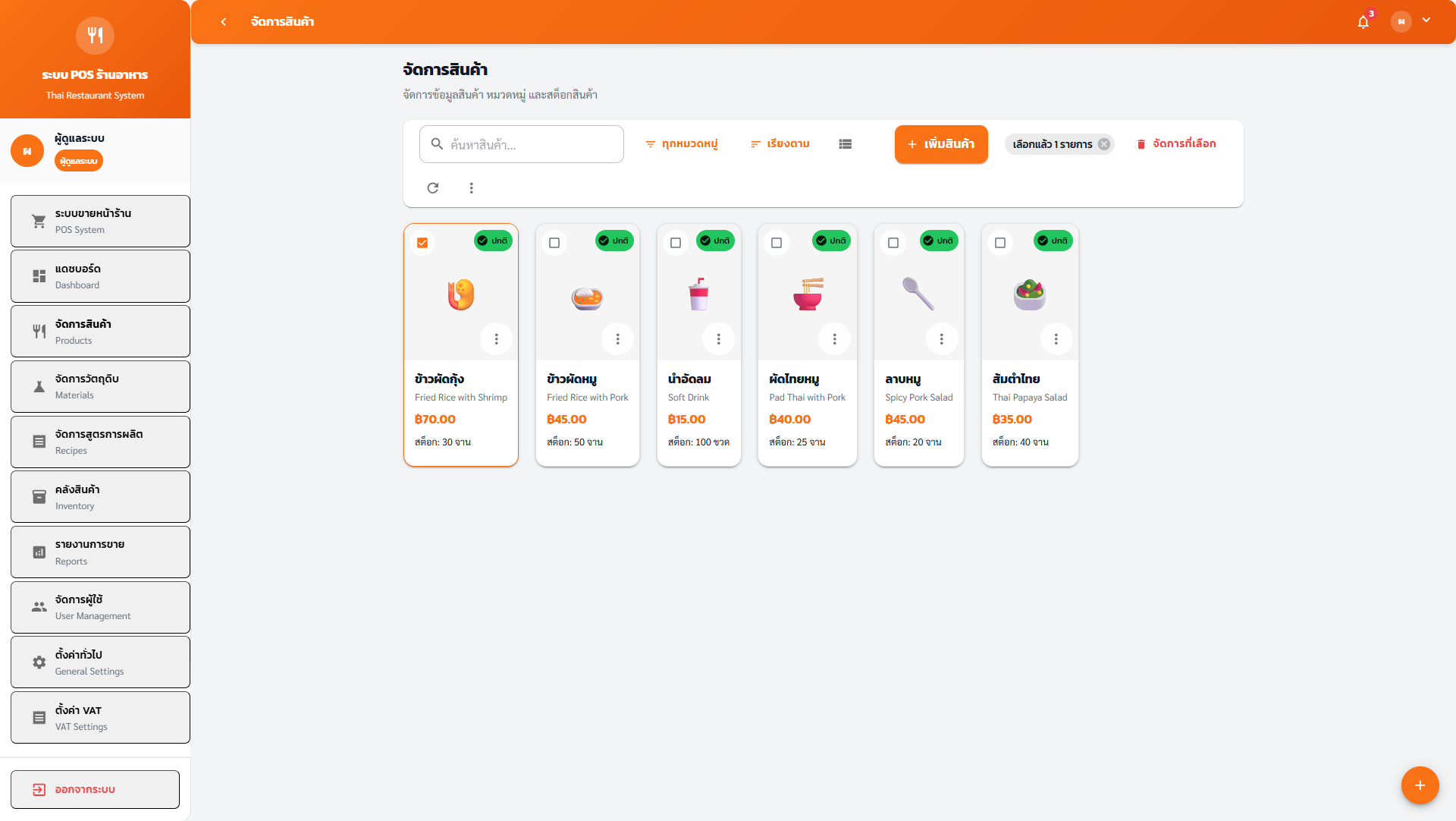
Catalog Workspace
พื้นที่ทำงานแคตตาล็อก
Managers configure menu details with bilingual content, pricing, tax flags, and barcode references. Live validation highlights missing data and conflicts before publishing to the POS terminal.
ผู้จัดการตั้งค่ารายละเอียดสินค้าได้ทั้งสองภาษา ระบุราคา ภาษี บาร์โค้ด พร้อมตรวจสอบข้อมูลแบบเรียลไทม์ก่อนปล่อยสู่หน้าจอขาย.
- Emoji or image thumbnails with automatic compression.
- รูปไอคอนหรือภาพจริงพร้อมบีบอัดอัตโนมัติ.
- Category color selector keeps POS grid visually consistent.
- เลือกสีหมวดหมู่เพื่อให้หน้าจอ POS ดูสอดคล้อง.
- Minimum stock thresholds trigger alerts on dashboard and POS.
- ตั้งขั้นต่ำสต๊อกเพื่อแจ้งเตือนบนแดชบอร์ดและหน้าจอขาย.
Bulk & Advanced Actions
คำสั่งรวมและความสามารถขั้นสูง
Perform stock adjustments, category reassignment, or price changes across multiple menu items in one pass. BOM-linked products automatically refresh recipe costing when updated.
ปรับสต๊อก ย้ายหมวดหมู่ หรือเปลี่ยนราคาหลายรายการพร้อมกัน สินค้าที่ผูกสูตรจะคำนวณต้นทุนใหม่ให้อัตโนมัติเมื่อแก้ไข.
- Bulk activate/deactivate to launch seasonal menus.
- เปิด/ปิดชุดเมนูตามฤดูกาลแบบรวดเดียว.
- Negative stock flag allows service items without inventory.
- ตั้งค่าให้บริการที่ไม่ต้องหักสต๊อกได้.
- CSV import/export keeps data in sync with ERP or delivery apps.
- นำเข้า/ส่งออก CSV เพื่อซิงก์กับ ERP หรือแอปเดลิเวอรี่.
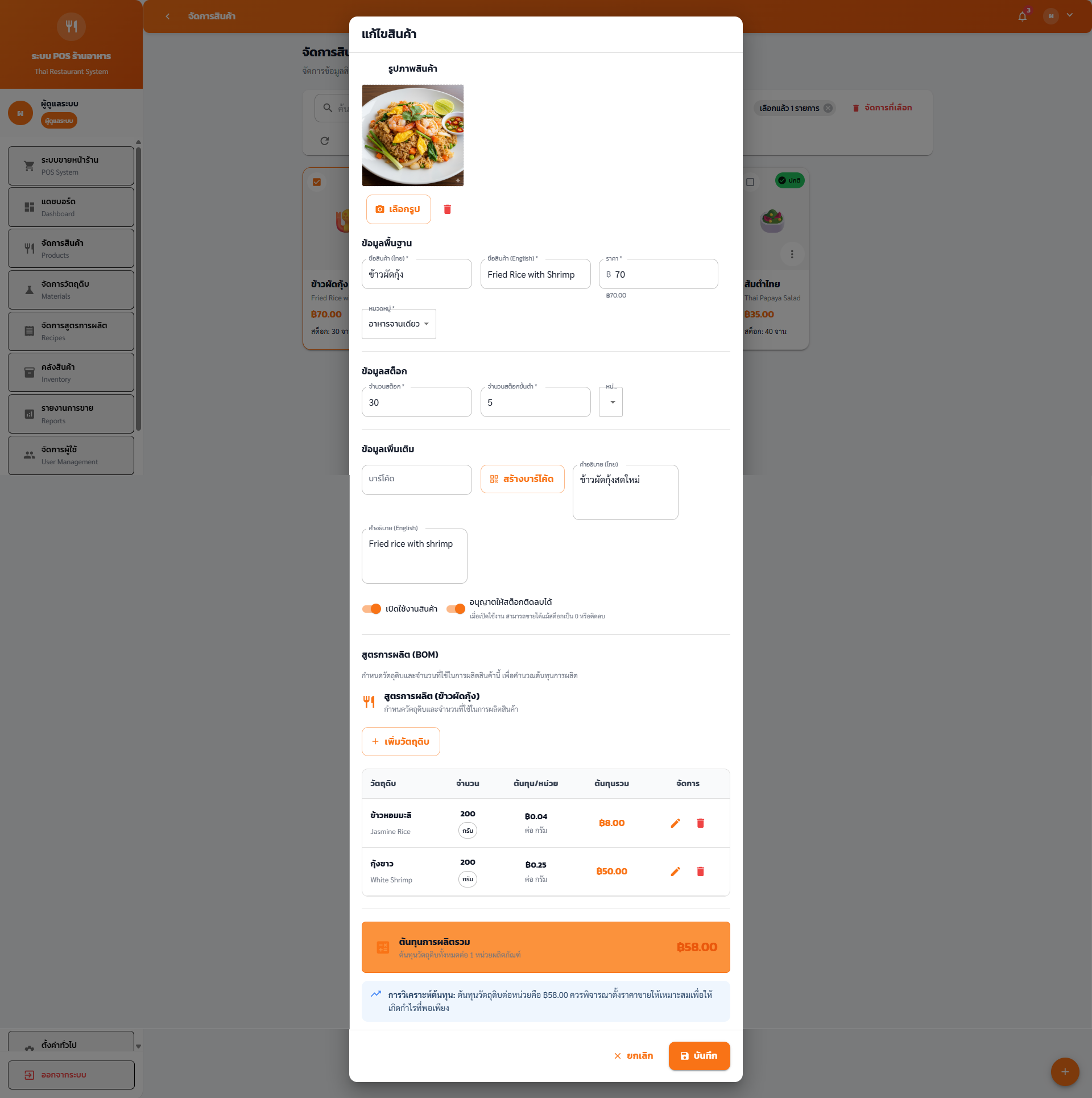
Interactive Gallery
แกลเลอรีแบบโต้ตอบ
Browse the catalog and setup experiences.
เลือกชมหน้าจอแคตตาล็อกและการตั้งค่า.